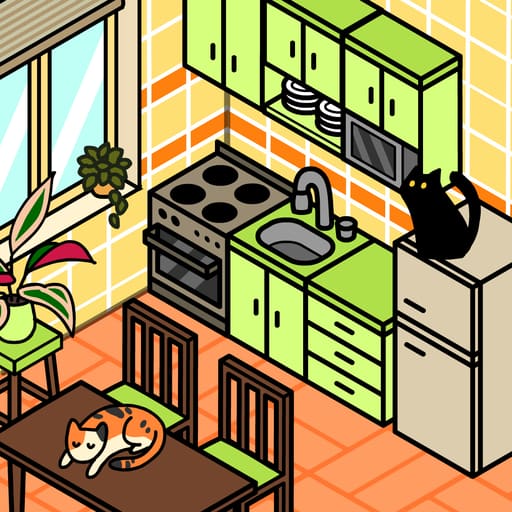
 Cozy Room Design
Design cozy bedrooms, kitchens, and living rooms with custom furniture and pets in Cozy Room Design, playable for free directly in your web browser.
Cozy Room Design Unblocked




























What is Cozy Room Design?
Cozy Room Design is a creative room decoration game developed by Entrevero Games and launched on December 21, 2023. The core experience centers on arranging furniture, wall coverings, flooring, and decorative pieces across an empty room to create a personalized indoor haven. Unlike fast-paced arcade titles, the game provides a calm sandbox environment free from time limits, point thresholds, or penalties. Players can freely test varied layouts, coordinate vibrant or muted color schemes, and save finished room layouts. The game plays free directly in modern web browsers on desktop computers, tablets, and smartphones without requiring any downloads or installation.
Key features
- Flexible room templates: Construct distinct spaces including a restful bedroom, a stylish kitchen, or a welcoming living room.
- Detailed color palettes: Personalize furniture, carpets, and wallpaper with matching color options to achieve a balanced look.
- Pet companions: Place cute cats and dogs on rugs, desks, beds, or floors to give each interior an inviting atmosphere.
- Orientation adjustments: Rotate furniture items smoothly using an on-screen button so every piece aligns with adjacent walls.
- Convenient image saving: Export your completed design directly to your device to share decorative work with friends.
- Cross-device flexibility: Enjoy seamless touch or mouse controls across desktop monitors and mobile screens in both portrait and landscape orientation.
How to play
- Select wallpaper patterns and flooring textures to establish the foundational mood of the room.
- Browse through the item catalogue to pick central furniture pieces like beds, desks, and storage shelves.
- Drag each selected object across the screen and place it into your target position.
- Tap or click the on-screen rotate button to adjust how furniture faces relative to walls.
- Layer rugs, windows, small accessories, and pets onto surfaces to bring extra character to the interior.
- Use the on-screen delete button to remove items that clutter the space or do not match your vision.
- Tap the save button on the left side of the screen once your room layout is finished.
Controls
| Action | Keyboard / mouse | Touch |
|---|---|---|
| Select item or color | Left mouse click | Tap screen |
| Reposition item | Click and drag | Drag across screen |
| Rotate item | Click on-screen rotate button | Tap on-screen rotate button |
| Delete item | Click on-screen delete button | Tap on-screen delete button |
| Save room creation | Click on-screen save button | Tap on-screen save button |
Room decoration and item arrangement
Decorating in Cozy Room Design revolves around layering objects logically within an interior canvas. Every room layout begins with broad architectural choices: flooring textures and wallpaper themes establish the primary backdrop. From there, foundational furniture like tables, couches, and beds define the functional areas of the space. Because items can be repositioned and rotated at any moment, experimenting with different spatial configurations requires no permanent commitment.
Once main furniture pieces are positioned, secondary accents add depth. Rugs sit beneath seating areas, wall art hangs above work desks, and windows provide visual balance along exterior walls. Players can also place domestic pets throughout the room, setting sleeping cats onto bedding or playful dogs near doorway mats. Choosing coordinated color swatches ensures that mismatched furniture pieces blend seamlessly into a unified aesthetic.
Tips and strategy
- Build from large to small: Place large furniture pieces such as beds and couches before placing small accessories to avoid overcrowded walking paths.
- Rotate pieces for natural flow: Use the rotate tool to face chairs toward tables and desks toward windows for a realistic living space layout.
- Coordinate surface accents: Place pets and small decorative items directly on desks or cushions to make the environment feel inhabited.
- Maintain visual balance: Leave open wall and floor areas between dense furniture clusters to keep the overall scene neat and restful.
- Harmonize color tones: Stick to complementary color palettes across rugs, wallpaper, and furnishings to tie the room together cleanly.
Similar games
If you enjoy styling spaces and creative customization, check out other casual creative titles available here:
- Become A Fashion Designer: Shifts the styling focus from indoor architecture to creating coordinated clothing collections and fashion runway looks.
- Dress Up The Lovely Princess: Offers relaxing character makeover gameplay with royalty-themed gowns, tiaras, and hair accessories.
- Pony DressUp 2: Lets you customize animal coats, colorful manes, and whimsical accessories in a gentle creative environment.
Entrevero Games has also produced other popular dress-up and styling releases, including Fairy Dress-Up and Kawaii Dress-Up, which share a similarly peaceful aesthetic.
Developer and history
Cozy Room Design was developed by Entrevero Games, an independent development studio recognized for making accessible browser titles. Released on December 21, 2023, the game expanded the studio’s portfolio of styling experiences alongside hits like Bearsus, Stick Fighter, and Fairy Dress-Up. The project was built to deliver a peaceful decorating simulation that loads smoothly across both desktop and mobile web browsers.